





Your car has a screen. Your phone has a screen. So why can one do almost everything while the other feels so limited?
Picture this.
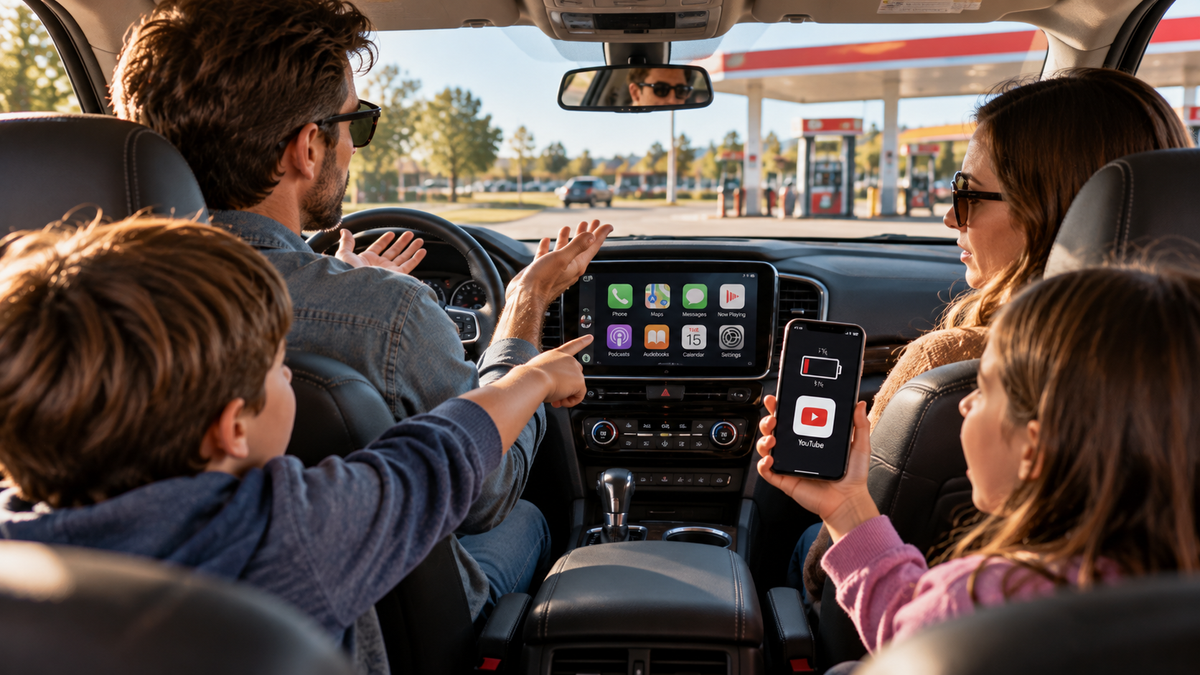
You've just pulled into a gas station after a long drive.
Your family is taking a break. The kids are getting restless, and everyone has another 30 minutes before hitting the road again.
One of your children wants to watch YouTube.
The problem? The phone is down to 1% battery.
Then someone points at the large touchscreen in the middle of your dashboard.
“Can't we just watch it there?”
You look at the screen.
It's a pretty nice display. Maybe even bigger than your phone.
It can show maps, play music, and handle phone calls.
So you tap around, looking for YouTube.
Nothing.
Netflix? Not there either.
Maybe there's an app store hidden somewhere in the settings?
Nope.
And suddenly, you're wondering something that seems perfectly reasonable:
If my car already has a touchscreen, why can't I use it like my phone?
The answer has less to do with the screen than you might think.
And depending on your vehicle, there may be ways to make that existing display more useful without replacing your dashboard.
1. Your Car's Touchscreen Isn't Necessarily a Tablet
Here's the first thing to understand.
A touchscreen is just the display. What it can actually do depends on the software behind it.
Think about the difference between a tablet and a touchscreen payment terminal.
Both respond to your fingers.
But only one is designed to let you download a wide variety of apps.
Your car's infotainment system works in a similar way.
Most factory systems are built around a specific set of functions: navigation, music, calls, messages, and vehicle settings.
Some newer vehicles offer built-in app stores or parked entertainment features. Others use more restricted software.
Car manufacturers limit available functions for reasons that include driver safety, hardware compatibility, software stability, and ongoing support.
That's why a vehicle can have a beautiful 12-inch touchscreen and still be unable to open the same apps you use on your phone.
Why Can't I Watch YouTube on My Car Screen?
Standard CarPlay provides access to supported driving-related apps. It doesn't automatically display every app installed on your phone.
That means having YouTube or Netflix on your smartphone doesn't make those apps available through the standard CarPlay interface.
And adding apps to a factory car touchscreen isn't always possible unless the manufacturer provides that capability.
The screen isn't necessarily outdated. It's the software environment that's limited.
2. Can You Add Apps to a Factory Car Touchscreen?
Sometimes—but the right solution depends on your factory infotainment system.
Before shopping for a CarPlay adapter or Android AI Box, check whether your vehicle has:
- Factory wired CarPlay or Android Auto: Many compatible adapters connect through the vehicle's existing USB data interface.
- Factory wireless CarPlay: Some newer devices support selected wireless vehicle connections, but many conventional adapters still require a wired factory interface.
- No factory CarPlay or Android Auto: A portable CarPlay screen or compatible aftermarket stereo may be a better choice.
A touchscreen and a USB charging port alone don't guarantee that an AI Box will work.
For example, LAMTTO RC23, RC26, and RC33 have specific factory wired connection requirements. RC31 supports factory wired connections and direct wireless connection on certain compatible vehicles.
CarPlay AI Box compatibility depends on the vehicle's model, year, infotainment system, and connection type—not simply whether the dashboard has a screen.
Your phone can matter too, particularly for advanced screen mirroring.
If you're unsure, confirm your exact vehicle and phone configuration before ordering.
If your vehicle doesn't have factory CarPlay, you may want to start with our guide to adding CarPlay to an older car. It explains the different upgrade options without replacing your entire dashboard.
3. CarPlay Adapter vs. Android AI Box: What's the Difference?
If you've searched for ways to get more apps on a car screen, you've probably seen terms like video adapter, screen mirroring, and Android AI Box.
They may look similar, but they solve different problems.
Video Adapters: More Entertainment Options
A compatible video adapter adds selected entertainment features to an existing factory screen.
Some include built-in video apps, so you don't need to mirror every video directly from your phone.
This is a practical approach if you mainly want entertainment during parked breaks.
Phone Mirroring: Use the Apps You Already Have
Screen mirroring displays compatible content from your smartphone on the factory display.
Some adapters also support touch control, allowing you to interact with mirrored content through the car's touchscreen when the phone and connection meet the requirements.
Unlike an Android AI Box, mirroring generally depends on your phone.
Android AI Boxes: A Separate App Environment
An Android AI Box runs its own Android-based system through a compatible factory display.
Depending on the model, it may offer Google Play, supported Android apps, navigation tools, and AI features.
It typically uses Wi-Fi or a phone hotspot for internet access.
Cellular AI Boxes: Internet Without a Phone Hotspot
A cellular AI Box adds another capability: its own mobile data connection.
With a compatible SIM card and data plan, it can connect to the internet without relying on your smartphone's hotspot.
That can be useful for frequent travelers, but it also introduces an additional service cost.

4. What Would You Actually Use Your Car Screen For?
Here's where choosing becomes easier.
Instead of starting with processors, memory, or long specification lists, think about the moments when your current screen feels limited.
Maybe you're waiting at a gas station.
Maybe you want your phone apps on a bigger display.
Or perhaps you spend hours traveling and want connected apps without constantly using your hotspot.
Those are different needs.
And they don't all require the same device.
If You Mainly Want YouTube and Netflix During Parked Breaks
Consider: LAMTTO RC23
Remember the family at the gas station?
If the main goal is to give everyone something to enjoy while the vehicle is safely parked, a focused video adapter may be enough.
The LAMTTO RC23 3-in-1 Video CarPlay Box offers built-in entertainment apps, including supported services such as YouTube, Netflix, TikTok, and Hulu.
It also adds wireless CarPlay and Android Auto functionality to compatible factory wired systems.
Dual-band Wi-Fi supports internet-dependent entertainment, while USB media playback and HDMI output provide additional media options.
RC23 isn't intended to be a fully open Android tablet. Its appeal is offering selected entertainment features without replacing your factory screen.
Best for: Drivers who mainly want supported video apps and wireless phone connectivity.
Before buying: RC23 requires a compatible factory wired CarPlay or Android Auto system, touchscreen, and USB data port. BMW, Tesla, and factory wireless-only configurations are excluded by the current product requirements.
If You Want Your Phone Apps on the Bigger Screen
Consider: LAMTTO RC33
Now imagine that you don't want a separate app environment.
You already have the apps you like on your phone.
You just wish you could display compatible content on your factory screen—and, when supported, control it through that larger touchscreen.
That's what makes the LAMTTO RC33 Mirror Touch Wireless CarPlay Adapter different.
RC33 combines wireless CarPlay and Android Auto with compatible phone screen mirroring.
Its distinctive feature is Mirror Touch, which allows supported phones to be controlled through the factory touchscreen using a compatible wired connection.
Instead of installing apps on another Android device, you're extending your existing phone experience.
For example, while safely parked, you might mirror supported phone content onto the dashboard display.
Best for: Drivers who prefer using compatible apps already installed on their phones and want a larger viewing and touch-control experience.
Before buying: RC33 requires factory wired CarPlay. Full wired Mirror Touch also requires a compatible factory touchscreen and a phone supporting USB-C DisplayPort Alt Mode. Not every USB-C phone supports this feature, and streaming playback can vary by app and phone.

If You Want Google Play, More Apps, and AI Features
Consider: LAMTTO RC26
Maybe a few built-in entertainment apps aren't enough.
You want to explore additional Android apps, use an AI assistant, or connect a compatible external display.
And you're comfortable using Wi-Fi or your phone's hotspot for internet access.
That's where the LAMTTO RC26 Wireless CarPlay AI Box becomes interesting.
RC26 provides an Android-based app environment with Google Play access, Gemini AI features, dual-band Wi-Fi, AirPlay, and HDMI output.
Imagine sitting in your parked car before an appointment.
Instead of being limited to the factory infotainment menu, you can open supported Android apps or use compatible AI features through the existing screen.
That offers more flexibility than a device focused mainly on preinstalled video services.
But Google Play access doesn't guarantee that every Android app will work correctly. Streaming services may have certification, software, or content-protection restrictions.
Best for: Drivers who want broader Android app access, AI features, and connected entertainment without replacing their dashboard.
Before buying: RC26 requires a compatible factory wired CarPlay or Android Auto connection. Internet-dependent features need a suitable Wi-Fi connection or hotspot; RC26 does not provide RC31-style independent 5G cellular internet.
If You Want Internet Without Relying on Your Phone
Consider: LAMTTO RC31
Now think about someone who spends a lot of time in the car.
Maybe you travel frequently for work.
Maybe your family takes long road trips.
Or perhaps you often wait in your parked vehicle between appointments.
You want connected apps, but you don't want to turn on your phone's hotspot every time.
The LAMTTO RC31 5G LTE CarPlay AI Box is designed for that kind of experience.
It combines an Android 15 system, Google Play, 8GB RAM, 128GB storage, independent GPS, and built-in 5G connectivity with 4G LTE support.
With a compatible SIM card and active data plan, RC31 can access mobile internet independently of your phone's hotspot.
That can make online navigation, supported apps, and parked entertainment more convenient.
RC31 can also use Wi-Fi, so a SIM card isn't required for basic operation.
The important difference from RC26 isn't simply more memory or a newer operating system.
It's the option to give your car's app environment its own cellular connection.
Best for: Frequent travelers and drivers who want a more independent Android experience with mobile internet access.
Before buying: Independent cellular service requires a compatible SIM card and data plan, sold separately. RC31 supports factory wired connections on compatible vehicles; direct wireless vehicle connection is limited to selected compatible BMW, Mercedes-Benz, Audi, and Volkswagen models.
Still wondering whether your car really needs its own internet connection? Read our guide to 5G connectivity in cars to see when a cellular AI Box makes sense—and when your phone's hotspot may be enough.

5. Which CarPlay Upgrade Fits Your Needs?
Not every driver needs the same features. The best upgrade depends on what you actually want to do with your car's screen.
| Your Main Need | Best Fit |
|---|---|
| Video apps while parked | RC23 |
| Phone mirroring and touch | RC33 |
| Android apps and AI | RC26 |
| Independent 5G internet | RC31 |
There's no single best upgrade for every driver.
Start with the features you'll actually use, and make sure your vehicle is compatible before choosing.
Explore All CarPlay AI Boxes & Adapters
6. Sometimes You Don't Need a New Screen. You Need New Possibilities.
Let's go back to that family at the gas station.
The kids are still waiting.
The phone battery is almost empty.
And the factory touchscreen is sitting right there.
The frustrating part isn't that the car lacks a screen.
It's that the screen doesn't offer the experience the family expected.
For one driver, a video adapter might solve the problem.
For another, it's mirroring a phone onto the larger display.
Someone else might prefer Google Play and AI features.
And a frequent traveler might appreciate a separate cellular connection.
These aren't four versions of exactly the same product.
They're four different ways to solve a similar frustration.
You don't necessarily need to replace your entire dashboard—or buy the most advanced device available.
Your car might already have the screen you want. You may just need the right way to use it.
Find the Upgrade That Fits Your Car—and Your Life
Explore LAMTTO's CarPlay adapters and AI Boxes, compare their capabilities, and check compatibility before choosing.
Explore LAMTTO CarPlay AI Boxes →
Video entertainment should be used only while safely parked or on appropriately positioned passenger displays where permitted by law. Drivers must keep their attention on the road.
Frequently Asked Questions
Why can't I watch YouTube on my car screen?
Standard CarPlay doesn't offer unrestricted access to video streaming apps. Some compatible aftermarket adapters and Android AI Boxes provide supported video features for use while safely parked.
Can you add apps to a factory car touchscreen?
It depends on the factory infotainment system. Some vehicles have built-in app stores. Others may work with compatible Android AI Boxes, while vehicles without supported factory connections may need a portable screen or aftermarket stereo.
What's the difference between a CarPlay adapter and an Android AI Box?
A basic adapter may add wireless connectivity or selected entertainment features. An Android AI Box runs a separate Android environment with access to supported apps. Phone mirroring is different again: it displays compatible content from your smartphone.
Is RC33 the same as RC26?
No. RC33 focuses on compatible phone mirroring and Mirror Touch. RC26 provides an Android app environment with Google Play and Gemini AI features.
Does RC31 need a SIM card?
Not for basic operation. RC31 can use Wi-Fi or a phone hotspot. To use its independent 5G/4G cellular connection, you'll need a compatible SIM card and active data plan.
Will a CarPlay AI Box work with any vehicle?
No. Compatibility depends on the vehicle's factory infotainment system, connection type, and sometimes the phone model. Always check the specific product requirements before purchasing.

Laat een reactie achter
Alle reacties worden gemodereerd voordat ze worden gepubliceerd.
Deze site wordt beschermd door hCaptcha en het privacybeleid en de servicevoorwaarden van hCaptcha zijn van toepassing.