


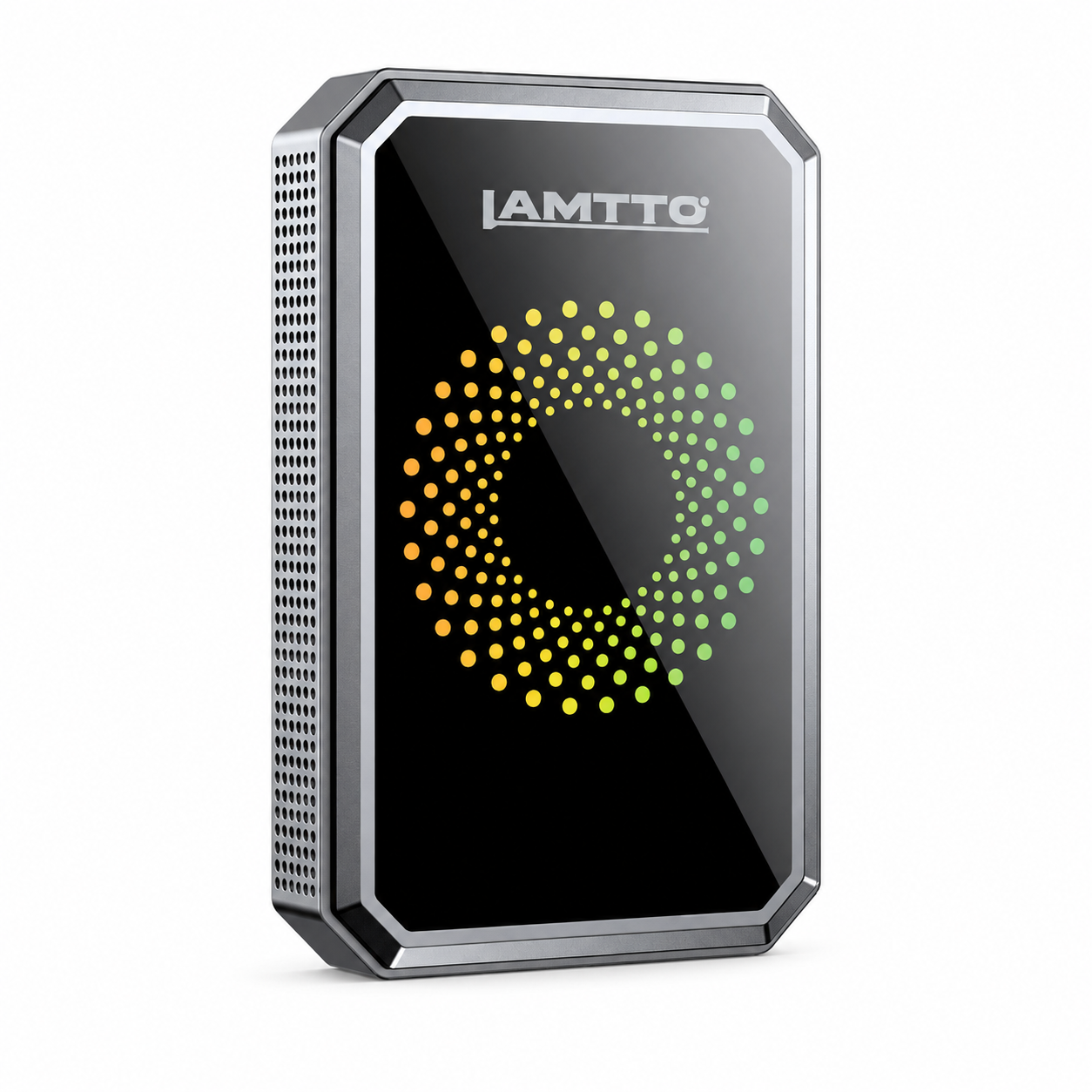


Buying a wireless CarPlay adapter can make everyday driving more convenient. You can connect your phone automatically, access navigation, make calls, and enjoy your favorite music without plugging in a cable every time.
But before you buy, there's one important question: Will a wireless CarPlay adapter actually work with your car?
The answer depends on your vehicle's factory infotainment system, wired Apple CarPlay or Android Auto support, USB data connection, and smartphone compatibility.
Not every car supports every wireless CarPlay adapter. Some models require factory-installed wired CarPlay, while advanced CarPlay AI Boxes may also need a compatible touchscreen.
In this guide, we'll explain six essential compatibility checks, common vehicle limitations, and how to choose the right LAMTTO adapter before purchasing.
Quick Answer: Will a Wireless CarPlay Adapter Work With Your Car?
A wireless CarPlay adapter generally works with vehicles that already support factory-installed wired Apple CarPlay. Some models also support factory wired Android Auto.
However, not all wireless adapters work the same way. Their compatibility requirements depend on the product type and features.
Here's the difference:
- Standard Wireless CarPlay Adapters: Convert an existing wired CarPlay connection into a wireless connection. Some models also support wired Android Auto.
- CarPlay AI Boxes: Add Android-based entertainment and additional functions. Compatible models may require factory wired CarPlay or Android Auto, a touchscreen, and a USB data port.
- Mirror Touch Adapters: Support wireless connectivity and additional phone mirroring features, but may have separate vehicle and smartphone requirements.
Before purchasing, always check the exact compatibility requirements of the adapter you plan to use.
1. Does Your Car Already Support Factory Wired Apple CarPlay or Android Auto?
This is the most important compatibility requirement.
A wireless CarPlay adapter does not usually create a completely new CarPlay system. Instead, it converts an existing wired connection into a wireless one.
That means your car's factory infotainment system must already recognize a compatible wired smartphone connection.

How to check:
- Start your vehicle and turn on the original infotainment system.
- Connect your iPhone or Android phone using a compatible USB data cable.
- Wait for the vehicle to recognize your phone.
- Check whether Apple CarPlay or Android Auto appears on the factory display.
If CarPlay launches through the USB connection, your vehicle has a wired CarPlay foundation that a compatible wireless adapter may use.
If nothing happens, check your vehicle settings, USB connection, and owner's manual before purchasing.
Important: Bluetooth audio and USB charging are not the same as wired Apple CarPlay. A vehicle that supports Bluetooth music streaming does not necessarily support CarPlay.
What If Your Car Only Has Factory Wireless CarPlay?
If your vehicle already supports factory wireless Apple CarPlay, you generally don't need a standard wired-to-wireless CarPlay adapter.
These adapters are primarily designed to convert an existing factory wired CarPlay connection into a wireless one. They do not upgrade every type of factory infotainment system.
For example, the LAMTTO RC23 requires factory wired Apple CarPlay or wired Android Auto. It does not support vehicles with factory wireless CarPlay only.
If your car already has wireless CarPlay, check whether you actually need additional features such as Android-based entertainment or phone mirroring before choosing another device.
Always review the individual product's compatibility requirements before purchasing.
Explore LAMTTO CarPlay Adapters
2. Does Your Car Have a Working USB Data Port?
Not every USB port inside a vehicle supports data transfer.
Some USB ports are designed only for charging smartphones, while others support both charging and communication with the factory infotainment system.
A wireless CarPlay adapter that connects through your vehicle's USB port needs a working USB data connection to communicate with the factory infotainment system.
A charging-only USB port may power the adapter, but it cannot provide the data connection required for normal operation.
The easiest way to test your USB port:
- Use a known working USB data cable.
- Connect your iPhone or Android phone to the vehicle's original USB port.
- Wait for the factory infotainment system to recognize the phone.
- Confirm that wired Apple CarPlay or Android Auto launches successfully.
If the phone only charges without being recognized by the factory display, try the original data-enabled USB port or check your vehicle's manual.
Remember: USB-A and USB-C describe connector types, not guaranteed data capabilities. Either type can support data transfer, but the actual function depends on the vehicle's USB hardware.
USB-A vs. USB-C: Does It Matter?
Both USB-A and USB-C can support data transfer. The connector shape alone does not determine compatibility.
What matters is whether the port supports the required data connection and whether the adapter has a compatible connector or supplied cable.
Before buying, check the USB connection type listed in the adapter's specifications.

3. Does Your Vehicle Have a Factory Touchscreen?
This check is particularly important if you're considering a CarPlay AI Box or an adapter with additional multimedia features.
A basic wireless CarPlay adapter and a video-enabled AI Box are not necessarily the same product.
A basic wireless adapter primarily converts your existing wired CarPlay connection into a wireless one.
An AI Box may provide a separate Android-based interface, supported entertainment apps, and additional functions through the original vehicle display.
For products such as the LAMTTO RC23, the factory touchscreen is part of the compatibility requirements.
Before purchasing an AI Box, confirm:
- Your vehicle supports factory wired CarPlay or wired Android Auto.
- Your original infotainment display supports touch operation.
- Your vehicle has a working USB data port.
If your car has a display without touch functionality, an AI Box requiring touchscreen control may not provide the intended experience.
What If Your Car Doesn't Have a Touchscreen?
You may want to consider a portable wireless CarPlay screen instead.
Unlike an adapter that depends on your factory infotainment display, a portable screen provides its own display and can be a practical alternative for compatible vehicles.
The right solution depends on your existing dashboard and the functions you want.
4. Is Your Car's Infotainment System Compatible With the Adapter?
Even if two vehicles have similar dashboards, their infotainment systems may operate differently.
Compatibility can depend on:
- Vehicle manufacturer
- Model and model year
- Original infotainment hardware
- Factory wired or wireless connection type
- USB data configuration
- Software and firmware behavior
For example, a vehicle manufacturer may introduce different infotainment systems across different model years.
A 2018 model and a 2024 model with the same vehicle name may not have identical connection requirements.
What About BMW, Tesla, and Other Special Cases?
Some vehicles have different infotainment configurations that may not support conventional wired-to-wireless adapters.
Some vehicle manufacturers use infotainment systems with different connection configurations, which can affect wireless CarPlay adapter compatibility.
For the LAMTTO RC23, BMW and Tesla vehicles are listed as incompatible.
This is an important distinction: having a large factory touchscreen or Bluetooth connectivity does not automatically mean a vehicle supports the wired CarPlay connection required by RC23.
If you drive a BMW, Tesla, or another vehicle with a non-standard infotainment configuration, do not assume compatibility based on the vehicle's model year or screen size alone.
Always check the exact product compatibility list or contact LAMTTO support before ordering.
However, compatibility should never be determined by brand name alone. Always check the exact vehicle configuration and individual product specifications.
Before ordering, we recommend confirming the following information:
| What to Check | Why It Matters |
|---|---|
| Vehicle make | Different manufacturers use different systems |
| Model | Infotainment hardware can vary |
| Model year | Connection features may change between years |
| Wired CarPlay support | Required for compatible wired-to-wireless conversion |
| USB data port | Provides communication with the adapter |
| Touchscreen | Required by certain AI Boxes |
If you're unsure, check your vehicle owner's manual or contact your dealership to confirm the original infotainment specifications.
5. Is Your Smartphone Compatible?
Your vehicle is only one part of the compatibility equation.
Your smartphone must also support the relevant wireless connection technology and operating system requirements.
For Apple users, check that your iPhone supports Apple CarPlay.
For Android users, check that your smartphone and vehicle support Android Auto.
Typical requirements include:
For iPhone users:
- A compatible iPhone model
- A supported iOS version
- Bluetooth and Wi-Fi enabled when pairing
- Apple CarPlay enabled in vehicle settings
For Android users:
- A compatible Android smartphone
- A supported Android operating system
- Android Auto support
- Bluetooth and Wi-Fi enabled when pairing
The exact minimum phone requirements depend on the adapter model.
For example, LAMTTO RC23 and other adapter models may have different phone and operating system requirements.
Also remember that wireless CarPlay and wireless Android Auto are not identical technologies. Check the product specifications to make sure your chosen device supports the phone you intend to use.
6. Are You Choosing the Right Type of Wireless CarPlay Adapter?
This is where many buyers make the wrong decision.
Not every CarPlay adapter offers the same functions. Some are designed only to eliminate cables, while others add video apps, Android features, or phone mirroring.
Choosing the right product starts with understanding what you actually want to upgrade.
Here are some options from LAMTTO:
Which LAMTTO Wireless CarPlay Adapter Should You Choose?
Once you understand your vehicle's compatibility requirements, the next step is choosing an adapter that matches your driving needs.
LAMTTO offers several solutions for different types of drivers.
LAMTTO RC23 – 3-in-1 Magic Video CarPlay Box
Best for drivers who want wireless connectivity and built-in entertainment.
The RC23 combines wireless Apple CarPlay, wireless Android Auto, and supported video applications in one device.
Key features include:
- Wireless Apple CarPlay and Android Auto.
- Built-in Netflix, YouTube, TikTok, and other supported applications.
- Android-based multimedia functions.
- USB media playback.
- HDMI output support.
Compatibility: Requires factory wired Apple CarPlay or wired Android Auto, a factory touchscreen, and a working USB data port. Not compatible with BMW, Tesla, or factory wireless-only configurations.
LAMTTO RC26 – 4-in-1 Wireless CarPlay AI Box
Best for drivers who want Google Play, AI features, and expanded entertainment options.
The RC26 offers more advanced Android-based functionality than a standard wireless adapter.
Key features include:
- Wireless Apple CarPlay and Android Auto.
- Google Play app support.
- Gemini AI voice assistance.
- Supported video streaming applications.
- HDMI output and AirPlay features.
Compatibility: Designed for compatible factory wired CarPlay or Android Auto systems. Check the exact vehicle, phone operating system, and model-specific requirements before purchasing.
LAMTTO RC33 – Mirror Touch Wireless CarPlay Adapter
Best for drivers who want phone mirroring and touchscreen control.
The RC33 adds phone mirroring and touch-control functionality to compatible factory CarPlay displays.
Key features include:
- Wireless Apple CarPlay and Android Auto.
- Full phone screen mirroring.
- Mirror Touch control.
- Support for compatible iPhone and Android devices.
Compatibility: Requires factory wired OEM Apple CarPlay. Wired mirroring additionally requires a supported phone with DisplayPort video output. Check the phone compatibility list before purchasing.
Which One Is Right for You?
- Want wireless connectivity and built-in video apps? Consider RC23.
- Want Google Play and Gemini AI features? Consider RC26.
- Want to mirror and control your phone through your factory screen? Consider RC33.
Always confirm the compatibility requirements of your chosen model before ordering.
Explore the complete LAMTTO adapter collection:
Shop All LAMTTO CarPlay Adapters
Wireless CarPlay Adapter Compatibility Checklist
Before purchasing a wireless CarPlay adapter, review these six compatibility factors:
| Compatibility Check | What You Should Confirm |
|---|---|
| Factory Wired Connection | Your vehicle supports the wired CarPlay or Android Auto connection required by your chosen adapter |
| USB Data Port | The selected USB port supports data transfer, not just charging |
| Factory Touchscreen | Required for AI Box models such as LAMTTO RC23 |
| Vehicle Compatibility | Your vehicle make, model, and year meet the product requirements |
| Smartphone Compatibility | Your iPhone or Android phone meets the adapter's requirements |
| Product-Specific Features | Additional functions such as phone mirroring and HDMI output are supported by your device setup |
Important: These requirements vary by product. For example, RC23 supports factory wired CarPlay or wired Android Auto, while RC33 requires factory wired OEM Apple CarPlay. Always check the exact compatibility specifications of the model you plan to purchase.
Frequently Asked Questions
1. Do wireless CarPlay adapters work with all cars?
No. Most wired-to-wireless CarPlay adapters require a vehicle that already supports factory wired Apple CarPlay. Some products also support wired Android Auto. Compatibility varies by adapter and vehicle configuration.
2. Can I use a wireless CarPlay adapter if my car only has Bluetooth?
Usually not. Bluetooth audio does not mean your vehicle supports factory wired CarPlay. A conventional wireless CarPlay adapter needs a compatible factory infotainment connection.
3. Can I use a wireless CarPlay adapter with a car that has no touchscreen?
Some basic wireless adapters may work with compatible non-touch factory systems, depending on the vehicle. However, an AI Box that requires touchscreen operation, such as the LAMTTO RC23, needs a compatible factory touchscreen.
4. Does a wireless CarPlay adapter work with Android phones?
Some adapters support both Apple CarPlay and Android Auto. However, not every product supports both. Check the individual product specifications and Android operating system requirements before purchasing.
5. Can I use a wireless CarPlay adapter with a car that already has wireless CarPlay?
A wired-to-wireless adapter is generally designed for factory wired systems, not vehicles that already have wireless CarPlay. Check the product's compatibility requirements before ordering.
6. How do I know whether my car's USB port supports data?
Connect your smartphone to the original USB port using a compatible data cable. If the factory display launches wired Apple CarPlay or Android Auto, the port supports the required connection. A charging-only port will not provide the same functionality.
7. What should I do if I'm not sure which LAMTTO adapter fits my car?
First, identify your vehicle's make, model, and year. Then confirm whether it supports factory wired CarPlay or Android Auto, whether it has a working USB data port, and whether the display supports touch if you're considering an AI Box.
8. Will a wireless CarPlay adapter work in an older car?
It depends on your vehicle's original infotainment system, not simply its model year. If your older car already supports factory wired Apple CarPlay or compatible wired Android Auto, it may work with a suitable wireless adapter. Vehicles without a compatible factory connection may need a portable CarPlay screen or another upgrade solution.
9. Can I use a wireless CarPlay adapter with multiple cars?
Some wireless CarPlay adapters can be moved between compatible vehicles. However, each vehicle must independently meet the adapter's compatibility requirements. You may also need to complete the initial setup again when switching cars.
10. Will a wireless CarPlay adapter make my factory CarPlay screen faster?
A standard wireless adapter mainly removes the need for a wired phone connection. It does not necessarily improve the speed of your vehicle's original infotainment system. AI Boxes offer additional processing and multimedia functions, but their performance depends on the device and vehicle configuration.
If you are still unsure, contact the LAMTTO support team before purchasing.
Final Thoughts: Check Compatibility Before You Buy
A wireless CarPlay adapter can make everyday driving more convenient, but choosing the right one starts with understanding your vehicle.
The most important things to check are your factory infotainment system, wired CarPlay or Android Auto support, USB data connection, touchscreen requirements, and smartphone compatibility.
If you only want to eliminate the USB cable, a standard wireless adapter may be enough.
If you want additional entertainment or Android-based functions, an AI Box may be a better fit for a compatible vehicle.
And if you want to mirror compatible phone content onto your factory display, a mirror-touch adapter may be worth considering.
At LAMTTO, we offer different adapter solutions for different driving needs.
Don't guess your compatibility. Check your vehicle first, choose the right adapter, and enjoy a smarter driving experience.
Explore All LAMTTO CarPlay Adapters
Note: Video playback should only be used when the vehicle is safely parked. Never watch video content while driving.


Dejar un comentario
Todos los comentarios se revisan antes de su publicación.
Este sitio está protegido por hCaptcha y se aplican la Política de privacidad de hCaptcha y los Términos del servicio.