





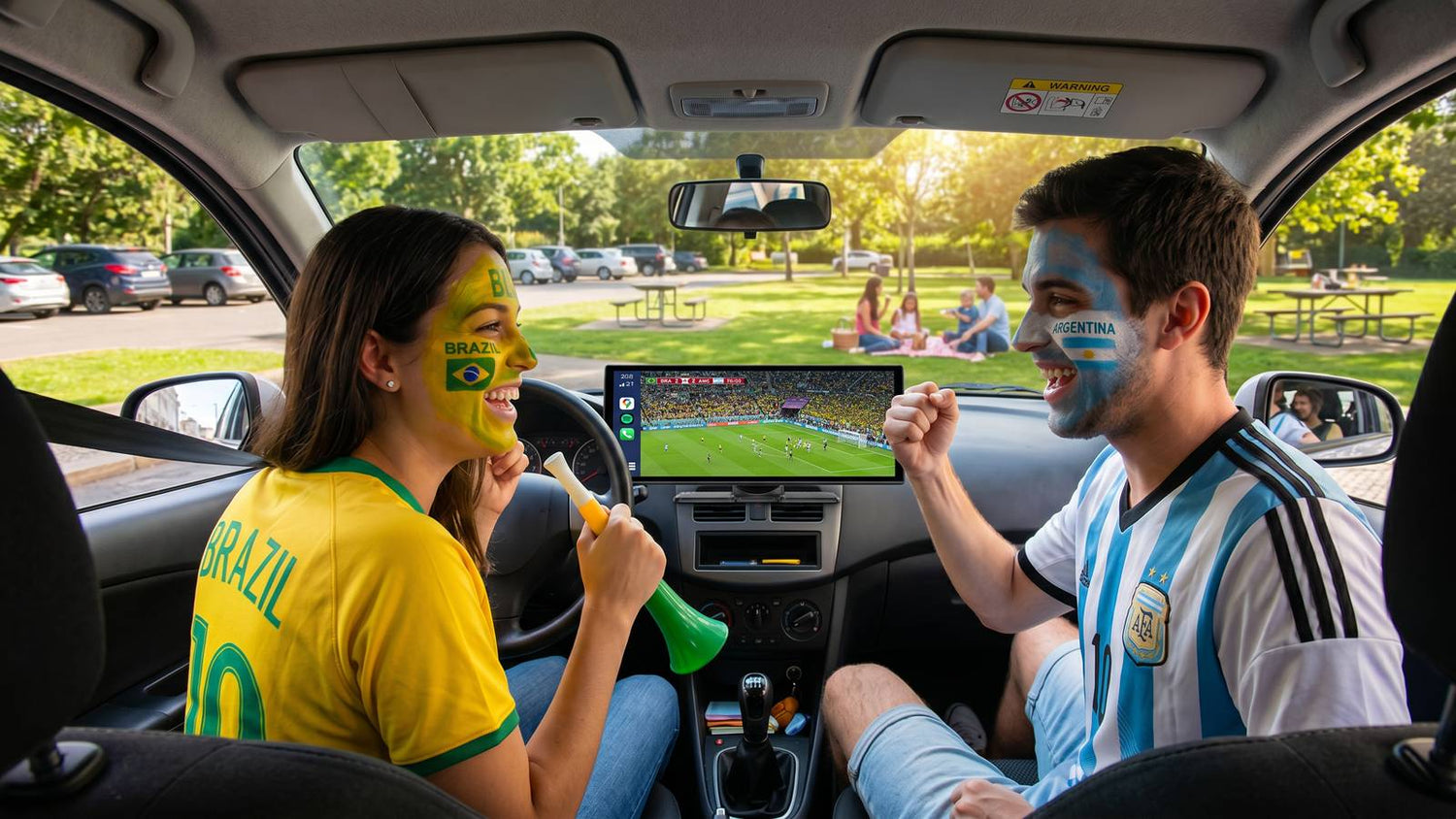
🏆 Must-Read für WM-Fans 2026: Fahren Sie zum Spiel? Machen Sie Ihr Auto zu einem mobilen Stadion
Die FIFA Fussball-Weltmeisterschaft 2026 steht vor der Tür – und sie ist anders als alle Turniere zuvor. Ausgetragen in 16 Städten in drei Ländern (den Vereinigten Staaten, Kanada und Mexiko), ist dies die größte Weltmeisterschaft aller Zeiten.
Und das bedeutet für Millionen von Fans eines: viel Autofahren.
Egal, ob Sie von LA zum SoFi Stadium für das Finale fahren, einen Roadtrip von Toronto zum BMO Field machen oder die Pilgerreise zum Estadio Azteca in Mexiko-Stadt antreten, die Wahrscheinlichkeit ist groß, dass Sie viele Stunden hinter dem Lenkrad verbringen werden. Und wenn das Infotainment-System Ihres Autos immer noch den Eindruck erweckt, im Jahr 2010 stecken geblieben zu sein ... nun, das ist eine lange, langweilige Fahrt.
Ich habe das auf die harte Tour gelernt, während eines kürzlichen Roadtrips. Zwei Stunden auf die Straße starren, Bluetooth alle 20 Minuten unterbrochen und die Kinder auf dem Rücksitz, die zum 47. Mal fragen: „Sind wir schon da?“ Dieser Trip hat mir klar gemacht: Wenn man den halben Tag damit verbringt, zum größten Fußballturnier der Welt zu fahren, verdient das Auto ein Upgrade.
🚗 Das Problem: Der Bildschirm Ihres Autos wurde nicht dafür gebaut
Die meisten werkseitigen Autobildschirme wurden entworfen, bevor es Streaming gab. Sie können grundlegende Navigation, vielleicht etwas Radio, und mit Glück eine kabelgebundene Telefonverbindung. Aber sie können nicht das, was Sie während eines WM-Roadtrips wirklich brauchen:
- Live-Streaming – um Pre-Match-Analysen im Stau zu verfolgen
- Zuverlässige Navigation – wenn Sie Staatsgrenzen mit lückenhaftem Mobilfunkdienst überqueren
- Unterhaltung für Passagiere – damit die Fahrt für alle angenehm ist, nicht nur für den Fahrer
- Dashcam-Aufzeichnung – denn lange Autobahnfahrten bedeuten mehr Risiko
Die gute Nachricht? Sie müssen kein neues Auto kaufen, um dies zu beheben. Sie brauchen nur einen intelligenteren Bildschirm.
📱 Drei Lösungen für jeden Fan-Typ
Nach wochenlangen Tests verschiedener Optionen, hier sind die drei Setups, die ich empfehlen würde – abhängig von Ihrem Auto, Ihrem Budget und wie ernst es Ihnen mit dem In-Car-Erlebnis ist.
1️⃣ „Ich habe bereits einen guten Autobildschirm“ – LAMTTO RC26 Adapter
Preis: 139,99 $ (sparen Sie 60 $ von 199,99 $)
Wenn Ihr Auto bereits einen werkseitigen Bildschirm mit kabelgebundenem CarPlay oder Android Auto besitzt, benötigen Sie wahrscheinlich kein komplett neues Display. Sie müssen es nur freischalten.
Der LAMTTO RC26 ist eine kabellose CarPlay AI Box, die an den vorhandenen USB-Anschluss Ihres Autos angeschlossen wird und Ihren werkseitigen Bildschirm sofort transformiert. Sie fügt drahtlose Konnektivität, Google Play zum Herunterladen von Apps und sogar den Gemini AI Sprachassistenten hinzu – alles, ohne etwas ersetzen zu müssen.
Warum es für WM-Reisen funktioniert:
- ✅ Macht Ihre kabelgebundene Verbindung drahtlos – kein lästiges Kabelgewirr mehr an jeder Raststätte
- ✅ Vorinstallierte Apps wie YouTube und Spotify ermöglichen es Ihnen, Vorab-Shows während Staus zu streamen
- ✅ Google Play ermöglicht das Herunterladen von Offline-Karten und Podcasts, bevor Sie in Gebiete ohne Empfang fahren
- ✅ 4 GB RAM sorgen für reibungslose Abläufe, selbst wenn Navigation und Streaming gleichzeitig laufen
- ✅ Gemini AI Sprachassistent für freihändige Navigation und Anfragen
Am besten für: Fans, die ein Auto ab 2016 mit kabelgebundenem CarPlay/Android Auto haben und ein schnelles, erschwingliches Upgrade wünschen. Einstecken, Hotspot verbinden, fertig – dauert etwa 5 Minuten.

2️⃣ Der „Sweet Spot“ – LAMTTO RC35 11" Display
Preis: 189,99 $
Wenn der Bildschirm Ihres Autos uralt (oder nicht vorhanden) ist, bietet der RC35 das beste Preis-Leistungs-Verhältnis. Es ist ein 11-Zoll-Tragbildschirm, der auf Ihrem Armaturenbrett oder Ihrer Windschutzscheibe montiert wird – keine professionelle Installation erforderlich.
Was ihn auszeichnet:
- ✅ 2-Sekunden-Startzeit – er ist bereit, bevor Sie sich angeschnallt haben
- ✅ Integrierte Unterhaltungs-Apps: YouTube, Prime Video, Spotify, TikTok, Hulu – alles direkt auf dem 11-Zoll-HD-Bildschirm streamen
- ✅ Kabelloses CarPlay und Android Auto – Ihr Telefon bleibt in der Tasche
- ✅ Inklusive AHD-Rückfahrkamera, so wird das Parken auf überfüllten Stadionparkplätzen weniger stressig
- ✅ Dual-WLAN bedeutet, dass Sie CarPlay und Videos gleichzeitig ohne Pufferung ausführen können
- ✅ AirPlay Mirroring – übertragen Sie den Bildschirm Ihres Telefons für lange Fahrten, Camping und Familienreisen
Das WM-Szenario: Sie kommen drei Stunden zu früh am Stadion an (weil, Fußballfans). Anstatt in einem überfüllten Parkplatz auf Ihrem Handy zu scrollen, sehen Sie die Vorab-Analyse auf einem 11-Zoll-Bildschirm mit Ihren Freunden. Das ist der Vorteil des RC35.
Über 1 Million Autofahrer weltweit nutzen bereits Lamtto-Produkte, und der RC35 taucht immer wieder in Creator-Rezensionen auf TikTok auf.
Am besten für: Fans, die ein großes Bildschirm-Upgrade wünschen, ohne den Flaggschiff-Preis zu zahlen. Familien lieben es, weil Passagiere streamen können, während der Fahrer navigiert.

3️⃣ Der „Ich will alles“ – LAMTTO RC32 11" AI Flaggschiff
Preis: 249,00 $ (sparen Sie 30,99 $ von 279,99 $)
Diesen habe ich letztendlich behalten. Der RC32 ist Lamttos Flaggschiff, und der Unterschied zwischen ihm und dem RC35 liegt in drei Dingen: Verarbeitungsleistung, KI und Unabhängigkeit von Ihrem Telefon.
Während der RC35 primär ein CarPlay-Bildschirm mit integrierten Streaming-Apps ist, läuft der RC32 mit einem vollständigen Android-System und einem 8-Core-Prozessor. Das bedeutet, er spiegelt nicht nur Ihr Telefon – er ersetzt die Notwendigkeit eines solchen im Auto.
Was der RC32 zusätzlich bietet:
- ✅ Voller Google Play Store – Laden Sie jede Android-App herunter, nicht nur vorinstallierte. Denken Sie an Netflix für Roadtrip-Stopps, Waze für die Navigation, Audible für lange Autobahnabschnitte
- ✅ Gemini AI Sprachassistent – Sagen Sie „Hey Google, ich bin müde, finde mir ein Café auf der Route“ und es funktioniert tatsächlich. Während eines WM-Roadtrips ist das wirklich nützlich
- ✅ Integriertes GPS-Modul – selbst wenn Ihr Telefon leer ist und Sie keinen Empfang haben, navigiert der RC32 weiter. Laden Sie Offline-Karten im Voraus herunter und Sie sind komplett unabhängig
- ✅ Split-Screen-Multitasking – Google Maps auf einer Seite und Spotify auf der anderen laufen lassen
- ✅ 60 FPS 1080P Display – spürbar flüssiger als Standardbildschirme, besonders bei Videoinhalten
- ✅ 1080P Rückfahrkamera mit Loop-Aufnahme – Dashcam-Funktion integriert
Die ehrliche Einschätzung: Ist der RC32 die zusätzlichen 60 $ gegenüber dem RC35 wert? Wenn Sie ein Power-User sind, der volle App-Freiheit und KI-Unterstützung wünscht, ja. Wenn Sie einfach nur YouTube streamen und CarPlay nutzen möchten, ist der RC35 wahrscheinlich ausreichend. Beide sind solide – es kommt darauf an, wie viel Wert Sie auf ein völlig unabhängiges Smart-System in Ihrem Auto legen.
Am besten für: Technik-Enthusiasten, Langstreckenfahrer und alle, die ihr Auto wie ein Fahrzeug von 2026 anfühlen lassen möchten, unabhängig davon, in welchem Jahr es tatsächlich gebaut wurde.

📊 Kurzvergleich
| Funktion | RC26 (Adapter) | RC35 (Display) | RC32 (AI Flaggschiff) |
|---|---|---|---|
| Preis | 139,99 $ | 189,99 $ | 249,00 $ |
| Typ | Plug-in-Adapter | 11" tragbares Display | 11" Smart System |
| Benötigt Werksbildschirm | Ja | Nein | Nein |
| Kabelloses CarPlay | ✅ | ✅ | ✅ |
| Android Auto | ✅ | ✅ | ✅ |
| Integrierte Apps (YouTube usw.) | ✅ | ✅ | ✅ (über Google Play) |
| Google Play Store | ✅ | ❌ | ✅ (voller Store) |
| KI-Sprachassistent | Gemini | Standard | Gemini AI |
| Eingebautes GPS | ❌ | ❌ | ✅ |
| Split-Screen | ❌ | ❌ | ✅ |
| Rückfahrkamera | ❌ | ✅ | ✅ |
| Am besten für | Schnelles Upgrade | Wert + großer Bildschirm | Volles Smart-Erlebnis |
🎯 Das Fazit
Die Weltmeisterschaft 2026 erstreckt sich über drei riesige Länder. Die Entfernungen sind real. Und die Fahrt zu den Spielen und von den Spielen zurück wird ein wesentlicher Bestandteil des Erlebnisses sein – ob das spannend oder anstrengend ist, liegt an Ihnen.
Das Upgrade der Unterhaltung in Ihrem Auto muss nicht Tausende kosten oder einen Werkstattbesuch erfordern. Produkte wie Lamtto haben es wirklich zugänglich gemacht: einfach einstecken, Ihr Telefon koppeln, und plötzlich fühlt sich Ihr Auto an, als wäre es für diese Ära gebaut worden.
Meine Empfehlung?
- Wenn Sie einen guten Werksbildschirm haben, holen Sie sich den RC26-Adapter und ersparen Sie sich den Ärger.
- Wenn Sie ein Großbildschirm-Erlebnis ohne den Flaggschiff-Preis wünschen, ist der RC35 der Sweet Spot.
- Wenn Sie der Typ sind, der alle Funktionen haben möchte und keine Kompromisse eingeht – der RC32 wird Sie fragen lassen, warum Sie so lange gewartet haben.
Welches Sie auch wählen, tun Sie es, bevor das Turnier in vollem Gange ist. Das Letzte, was Sie wollen, ist im Stau vor dem Stadion festzustecken und die Pre-Match-Show auf einem 6-Zoll-Telefonbildschirm zu sehen, während das Auto neben Ihnen sie auf einem 11-Zoll-Display abspielt.
Gute Fahrt. Und genießen Sie das schöne Spiel. ⚽🚗

Hinterlasse einen Kommentar
Alle Kommentare werden vor der Veröffentlichung geprüft.
Diese Website ist durch hCaptcha geschützt und es gelten die allgemeinen Geschäftsbedingungen und Datenschutzbestimmungen von hCaptcha.